Understanding Box Die-line and 3D Mockup Die Cut Templates for Designers
Box die-line and 3D mockup die cut templates are essential tools in the packaging and graphic design industries. These digital assets allow designers to create accurate representations of box shapes, folds, and cuts before moving into production. They serve as blueprints for how a flat design will transform into a three-dimensional object. With these templates, professionals can visualize the final product more effectively and ensure that every detail aligns with their creative vision.
What Are Box Die-line and 3D Mockup Die Cut Templates?
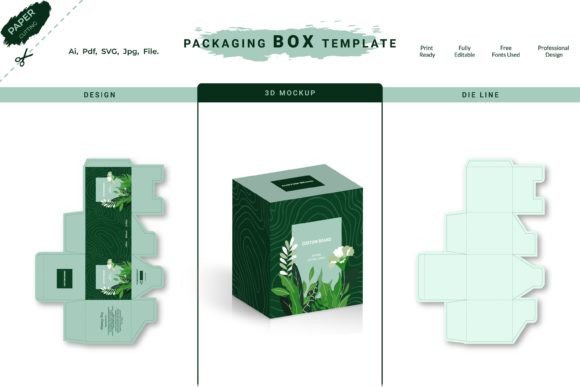
A box die-line is a technical drawing that outlines the exact shape, size, and folding structure of a box. It includes precise measurements and fold lines so that when printed and folded, the result matches the intended physical product. A 3D mockup die cut template takes this concept further by providing a visual simulation of how the box will appear once assembled. These templates are often used to showcase product designs on websites, in marketing materials, or during client presentations.
Together, they form a comprehensive set for creating high-quality packaging mockups. The die-line ensures structural accuracy, while the 3D mockup offers a realistic preview. These files are typically provided in multiple formats such as AI (Adobe Illustrator), PDF, SVG, and JPG to support various editing and display needs.
Why Use Box Die-line and 3D Mockup Die Cut Templates?
Designers and businesses use these templates for several reasons:
- Accuracy in Packaging Design: Die-lines help avoid costly errors by ensuring the box dimensions and folds are correct before manufacturing.
- Time Efficiency: Having ready-to-use templates speeds up the design process, allowing for quick iterations and revisions.
- Realistic Visualizations: 3D mockups provide a lifelike view of the final product, which is invaluable for client approval and customer expectations.
- Cost Savings: Digital prototyping reduces the need for physical samples, saving both time and money.
- Customization: These templates are fully editable, enabling users to tailor them for specific branding, products, or personal projects.
Benefits of Using Vector-Based Box Die-line and 3D Mockup Files
One of the most significant advantages of working with vector-based box die-line and 3D mockup die cut templates is scalability. Unlike raster images, vectors maintain clarity at any size, making it easy to adjust the design for different applications—whether it’s a small business card holder or a large retail display box.
Additionally, vector files like AI and SVG offer layer separation, meaning you can place your artwork above the die-line without overwriting critical structural elements. This flexibility is crucial for maintaining the integrity of the box design while customizing its appearance.
The inclusion of multiple file types—such as AI, PDF, SVG, and JPG—ensures compatibility across design software and platforms. Whether you're preparing for print or digital use, there's a format suited for your workflow.
Key Considerations When Choosing a Template Set
While box die-line and 3D mockup die cut templates offer many benefits, there are important factors to consider before purchasing or using them:
- Intended Use: Determine whether the template is for print production, digital presentation, or online sales. Some templates may be optimized for one purpose but not ideal for others.
- Compatibility: Ensure the file formats included work with your design software. Adobe Illustrator is common, but SVG and PDF versions are also widely supported.
- Resolution and Quality: Even though vector files are scalable, the accompanying image files (like JPG) should have high resolution to maintain quality in visual displays.
- Editing Experience: If you’re new to working with die-lines, look for templates with clear instructions and well-organized layers to ease the customization process.
- Physical vs. Digital Output: Remember that these are digital cut files. No physical boxes are shipped; you’ll need to either print and assemble them yourself or collaborate with a manufacturer for production.
Situations Where These Templates Are Ideal
Box die-line and 3D mockup die cut templates are particularly useful in the following scenarios:
- Product Launches: Businesses preparing to launch a new product can use these templates to present a professional prototype to stakeholders or customers.
- Graphic Design Projects: Designers who need to create packaging visuals for clients benefit from having an editable, realistic mockup without needing access to a printing press.
- E-commerce Product Photography: Online retailers often use 3D mockups to show how products will appear in real-world settings, enhancing customer confidence and engagement.
- Personal Creative Work: Hobbyists and artists can experiment with box designs for gifts, packaging, or art installations using these versatile templates.
When Alternatives Might Be Better
Although these templates are powerful, they might not be the best fit in all cases. Consider the following alternatives if your needs don’t align with what box die-line and 3D mockup die cut templates provide:
- Pre-made Boxes: For those who want a ready-to-use physical box without the hassle of designing, pre-made packaging options can be more practical and cost-effective.
- 3D Modeling Software: Advanced users may prefer tools like Blender or Cinema 4D for full control over the mockup creation process, especially for highly customized or complex designs.
- Flat Lay Mockups: In some marketing contexts, a simple flat lay image of a product on a surface may suffice without the need for a 3D box structure.
- Print-Ready Templates Without Mockups: If you only need the structural blueprint for manufacturing, you might choose a basic die-line template instead of a bundled package with a 3D mockup.
How to Evaluate and Select the Right Template
To determine whether a box die-line and 3D mockup die cut template fits your needs, follow these practical steps:
- Review File Contents: Check if the template includes all necessary file types (AI, PDF, SVG, JPG) and confirm the presence of an editable version for customization.
- Assess Realism and Flexibility: Look at sample mockups to see how realistic the 3D rendering appears and whether you can easily modify colors, textures, or logos.
- Check for Clear Instructions: A good template should come with guidelines or tutorials explaining how to edit and apply the design correctly.
- Consider Your Skill Level: If you're not experienced with design software, opt for templates that are user-friendly and include organized layers for easy editing.
- Look for Reviews or Samples: Before purchasing, review feedback from other users or request a sample file to test the template’s usability and output quality.
Expectations and Limitations
It’s important to understand what to expect—and what to avoid—when working with these templates:
- Expect a Digital Product: As noted, these are digital-only files. You won’t receive a physical box, but you will get the ability to create one through printing or manufacturing services.
- Be Aware of Assembly Requirements: If you plan to print and assemble the box yourself, ensure you have the right tools and materials. Not all templates are designed for DIY assembly.
- Understand Licensing Terms: Confirm whether the template is for commercial use or personal projects. Some templates require attribution or restrict usage in certain contexts.
- Know the Purpose of Each File Type: While AI and SVG files allow for detailed editing, JPG files are usually static and suitable for presentation or web use only.
Final Thoughts on Box Die-line and 3D Mockup Die Cut Templates
Box die-line and 3D mockup die cut templates are valuable assets for anyone involved in packaging or product design. They combine precision with creativity, offering a reliable way to visualize and refine your ideas before final production. By understanding their capabilities and limitations, you can make an informed decision about whether they meet your current project requirements.
If you're looking for a solution that allows for high-quality, customizable mockups without the expense of physical prototypes, these templates could be an excellent choice. However, always evaluate your specific goals and resources to ensure the best possible outcome.